
Job – what is important for you?

work experience meme

This will be not a technical article, but just a philosophical digression about personal values and preferences. So if this topic is not interesting for you – feel free to skip reading and see you in the next tech post 😉

During my carrier, I changed workplace 4 times (officially more, but in some cases, it was the same company but another location or another company name with the same people in it). Probably 4 times is not a tremendous “switch experience”, but I decided to share my thoughts which I’ve gathered so far.

I remember my first company during my university years, well, at that time I actually didn’t care too much about company values, atmosphere, or vision, the only 1 thing I cared about is getting a production experience. At a point when you have nothing to compare with – everything is great. That how it was in my first company 😉 I was ready to even work for free, just if someone will teach me how to write the software. Now I remember these times with warm nostalgia in my heart.

I believe things changed for me when I switched from my first job (it was a small student company of 10 people in rented apartments in the suburbs area) to a “real” software company of a few thousand employees. During that stage, I learned that you don’t have to put your heater and coffee beans from home to drink a coffee at the workplace, or that it’s not necessary to have an extra sweater in the office, because the heating system could go down at every minute at wintertime.

In addition to benefits, I also found cons of big companies, in my case, it was an absence of feeling that my everyday work at any point important for the good of the company. Every now and then, it was only a tiny task, without an understanding of why it should be done or who will use this feature. For me, such an environment acted as a demotivation and real-life example of the old joke about Soviet Soldier duties – to dig from “here”, till lunchtime.

So after almost 4 years of work in that place, I decided to try work in a small company, which will give a basic level of comfort from one side (good working heating system in winter) and a “sense” of developer work from another. That was a small 25 people company (in fact there were 2 separate companies with the same people) where I’ve spent the next 3 years. During the whole employment time I enjoyed work there because, in a small group, you could make a decision and later see the consequences (good or bad) of that. I believe that there is no better teacher than our own failures and wins. At every point in time, I knew why I do what I do.

Usually, in such companies, you’ll not find a dedicated person for every activity, such as a QA engineer or DevOps. It means that 99% of technical duties are on the developer’s shoulder. There are pros and cons of such a solution.

Good thing is that during DevOps or BA activities you have an opportunity to know the product from a different perspective, which allows solving more complex problems in a more elegant way as well, as creating more accurate estimates.

Bad thing is that sometimes it’s too much. No one could be an expert in all areas, everyone has some kind of accent (for instance DevOps, backend, or frontend development). And from my perspective, such an approach aka “Universal Soldier” creates run-down software with a weak architecture. Every time someone who has to make an important decision on a bunch of topics, could rely only on their own very shallow knowledge in that particular area. E.g. I as a mostly backend developer could create a cloud infrastructure for my software, but for sure it will not be as good as some DevOps solution.

At the end of my second year in that company, I started considering what next? Not in terms of a new place, but what else could I do here to grow as a professional. I tried myself in almost every possible role in that company and it occurred that “start-up like” companies have pretty limited opportunities for employees in terms of growth path. You could like your daily routine, salary, and colleagues, but there is always a pretty low “sealing”, and as soon as you reached that level, you could do nothing but accept that fact.

So on 7th year of my career, I decided to start once again in a big company, but this time I have some experience and a bit more solid understating of what I want and what I don’t want 😉

This article has nothing to learn from, but just a reflection through the prism of my own vision and experience. So please criticize me too much 😜. I believe that set of values is a very unique for everyone and obviously there is no perfect place to work on, but as old idiom says:

The road to excellence is always under construction

Be safe and stay tuned!

ASP.NET MVC (Not Core) in Windows Docker Container

Recently I’ve faced a task to dockerize legacy applications written in ASP.NET Core. Developers use IIS for the local development environment, but when a new teammate has to install the local environment, it takes ~8 hours to do all mumbo-jumbo to make everything works. So we decided to move the legacy application to docker, at least for the local development purpose at the beginning (aka “A Journey of a Thousand Miles Begins with a Single Step”).

Before I start, it is worth to mention, that I struggled to find a bit amount of info about containerizing ASP .Net Framework apps in Windows Containers. Almost all of the threads I’ve found were related to Linux Containers and .Net Core. So I’ve decided to share my own experience with such a task.

So the requirements after the dockerization were:

  • The application should still be hosted in IIS, due to internal app configuration
  • Changes in code files should be visible in the application with additional actions (except local build if needed)
  • Code should be debuggable
  • Deployed apps in containers should have custom hostnames
  • “One command run” process (instead of 8 hours of configuration)
  • Some apps use legacy AngularJS framework, with bower, etc. So Node Js should be available to use in containers
  • The Application should work 🙂

As a base, I’m going to use mcr.microsoft.com/windows/servercore/iis image, it is lighter than mcr.microsoft.com/dotnet/framework/aspnet image, so as smaller as better.

The code below downloads the nodejs distributive archive, next save it in image storage, unarchive to the folder and add this folder to the PATH variable. It will allow using node and npm command in the command line.. The last thing is the cleanup of the downloaded zip archive.

ADD https://nodejs.org/dist/v12.4.0/node-v12.4.0-win-x64.zip /nodejs.zip
RUN powershell -command Expand-Archive nodejs.zip -DestinationPath C:\; 
RUN powershell Rename-Item "C:\\node-v12.4.0-win-x64" c:\nodejs
RUN SETX PATH C:\nodejs
RUN del nodejs.zip

Next part of the code does the same, but here RemoteTools for Visual Studio is downloaded and installed, we will need it later for debugging.

ADD https://aka.ms/vs/16/release/RemoteTools.amd64ret.enu.exe /VS_RemoteTools.exe
RUN VS_RemoteTools.exe /install /quiet /norestart
RUN del VS_RemoteTools.exe

Now, as IIS should be used as a hosted server, we need to remove default content from inetpub\wwwroot folder. Later we will use this folder for own code.

RUN powershell -command Remove-Item -Recurse C:\inetpub\wwwroot\*

To be able to use ASP.NET application in IIS, we have to install Windows Feature by:

RUN powershell -command Install-WindowsFeature NET-Framework-45-ASPNET
RUN powershell -command Install-WindowsFeature Web-Asp-Net45

In order IIS to use content of inetpub\wwwroot folder, it is necessarry to add permission for access files. As we are using docker for development purposes and it is isolated, it is OK to grant everyone to access files by command:

RUN icacls "c:/inetpub/wwwroot" /grant "Everyone:(OI)(CI)M"

Now it is crucial to tell docker about our context:

WORKDIR /inetpub/wwwroot

Last, but not least, we have to run msvsmon.exe tool to allow remote debugging from Visual Studio. It is important to use as the lowest access restrictions as possible, just to omit to add exceptions to a firewall, auth issues, etc. (but remember that it is not enough for any kind of public access deployment option)

ENTRYPOINT ["C:\\Program Files\\Microsoft Visual Studio 16.0\\Common7\\IDE\\Remote Debugger\\x64\\msvsmon.exe", "/noauth", "/anyuser", "/silent", "/nostatus", "/noclrwarn", "/nosecuritywarn", "/nofirewallwarn", "/nowowwarn"]

The whole Dockerfile:

FROM mcr.microsoft.com/windows/servercore/iis

ADD https://nodejs.org/dist/v12.4.0/node-v12.4.0-win-x64.zip /nodejs.zip
RUN powershell -command Expand-Archive nodejs.zip -DestinationPath C:\; 
RUN powershell Rename-Item "C:\\node-v12.4.0-win-x64" c:\nodejs
RUN SETX PATH C:\nodejs
RUN del nodejs.zip

ADD https://aka.ms/vs/16/release/RemoteTools.amd64ret.enu.exe /VS_RemoteTools.exe
RUN VS_RemoteTools.exe /install /quiet /norestart
RUN del VS_RemoteTools.exe

RUN powershell -command Remove-Item -Recurse C:\inetpub\wwwroot\*
RUN powershell -command Install-WindowsFeature NET-Framework-45-ASPNET
RUN powershell -command Install-WindowsFeature Web-Asp-Net45

WORKDIR /inetpub/wwwroot

RUN icacls "c:/inetpub/wwwroot" /grant "Everyone:(OI)(CI)M"

ENTRYPOINT ["C:\\Program Files\\Microsoft Visual Studio 16.0\\Common7\\IDE\\Remote Debugger\\x64\\msvsmon.exe", "/noauth", "/anyuser", "/silent", "/nostatus", "/noclrwarn", "/nosecuritywarn", "/nofirewallwarn", "/nowowwarn"]

Obviously, we could run it file with docker run command, but let’s imagine we also need a create a database container for our application, so to fulfill the requirement of “One Command Run” I’ve created a docker-compose file

version: "3.8"

services:
  app:
    build: .
    image: samp.compose:latest
    ports:
      - "83:80"
      - "84:443"
    networks:
      app-network:
        ipv4_address: 10.5.0.5
    depends_on:
      - db
    hostname: samp
    
  db:
    image: microsoft/mssql-server-windows-express
    networks:
      - app-network
    ports:
      - "1433:1433"
    environment:
      - sa_password=test123
      - ACCEPT_EULA=Y
    hostname: dockerdb
    
networks:
  app-network:
    driver: nat
    ipam:
      config:
        - subnet: 10.5.0.0/16
          gateway: 10.5.0.1

As you can see, docker-compose file contains 2 services and 1 network, almost nothing special. But there are 2 things are worth to highlight:

  • Creating a network with an explicitly specified gateway and subnet. It will allow setting a predefined IP address for our containers (we will later use it for mapping to host). If you will not do that, then every time a container will be created, the new IP address will be automatically assigned from a pool of available IPs.
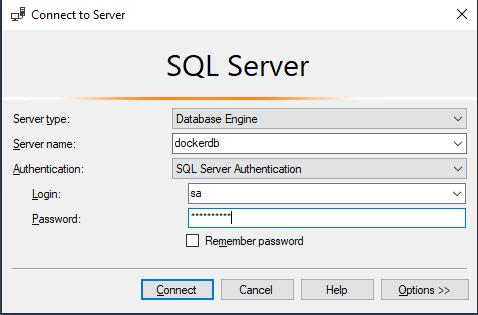
  • Using hostname in the db service. This allows us to use the hostname in the connection string outside of the container and app-network. For example, now it is possible to connect to this SQL server from your Windows machine using SSMS using the hostname as a Server name:

So now we could run our application just by command docker-compose up

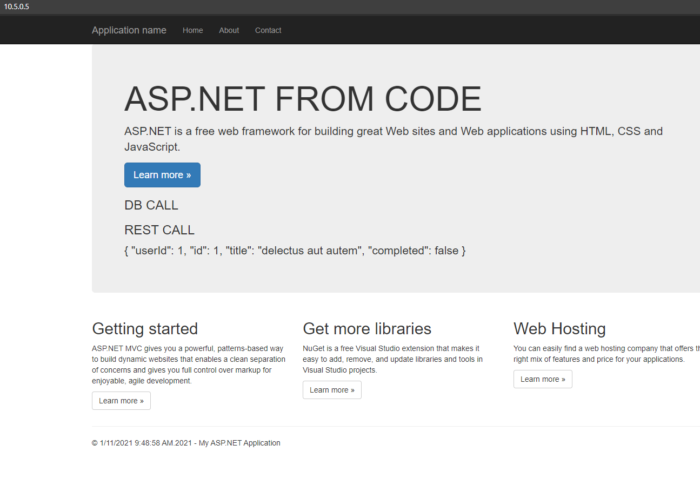
Now just open the browser and put the IP from the docker-compose file (in my case 10.5.0.5) of app service and you should :

Now you could change your code and rebuild (if needed) the project on local machine to see changes on website.

Let’s check if our project has a nodejs installed (which potentially could be needed for some frontned build actions).

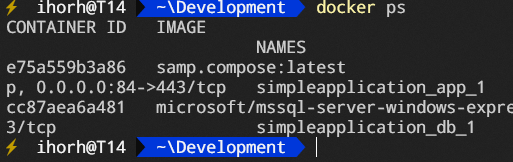
To do that, put the command docker ps and copy the container id of the app container:

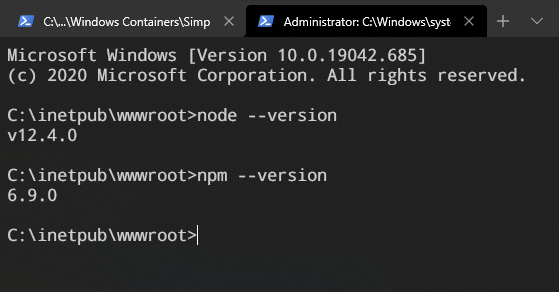
Now put the command docker exec -it {YOUR CONTAINER ID} cmd. This command will connect to the container and run the cmd command. Now let’s just put node –version to check if nodejs is installed.

Node version is displayed, so now we could use it (together with npm) for further development

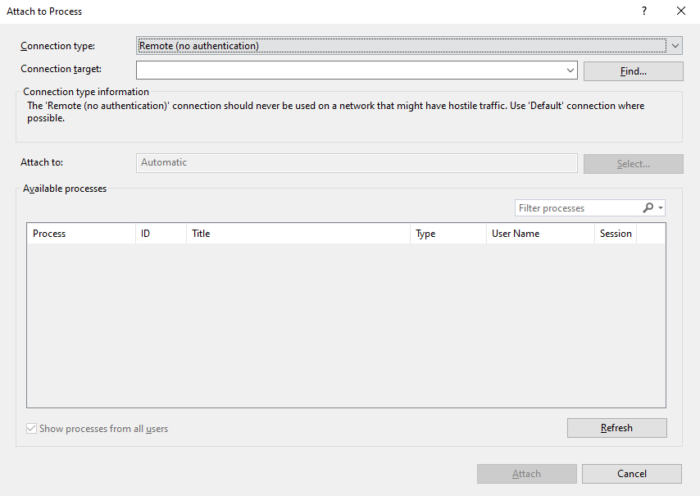
The next thing is debugging, as you remember we’ve added execution of msvsmon.exe as an entry point for our container. It allows us to use Visual Studio Remote Debugging. For that, just click Ctrl + Alt + P and select Remote (no authentication) and click the Find button:

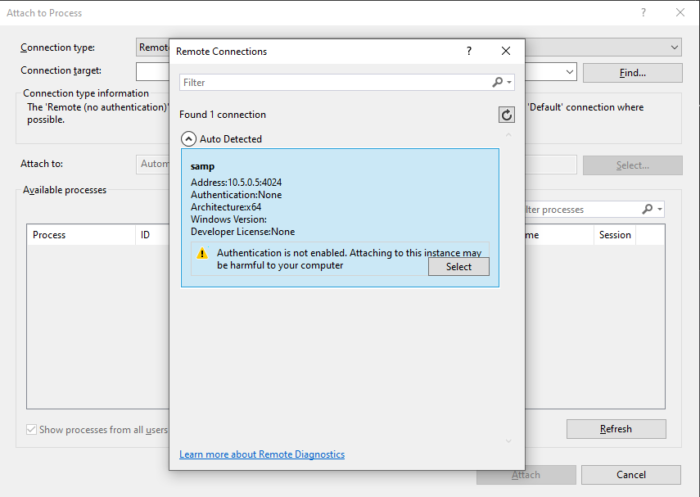
Next select created app from the list:

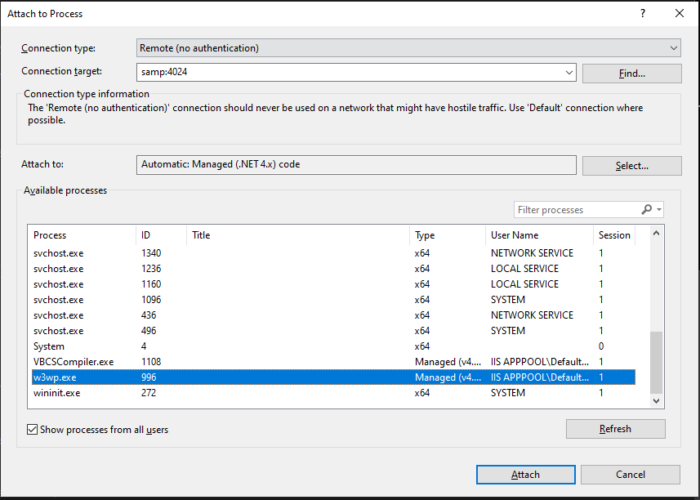
The last thing is to check Show processes for all users and select IIS process w3wp.exe. (You may need to open your website in browser to start the lazy IIS process)

After VS attached to process, it is possible to use the regular debug experience.

The last requirement from the list is that applications in containers should run under hostname. To do that, we have to open C:\Windows\System32\drivers\etc\hosts file (you have to do that with admin rights) and append a line to the end and save the file.

10.5.0.5       samp.local.com

Where 10.5.0.5 is the IP from the docker-compose file, and samp.local.com is your custom hostname.

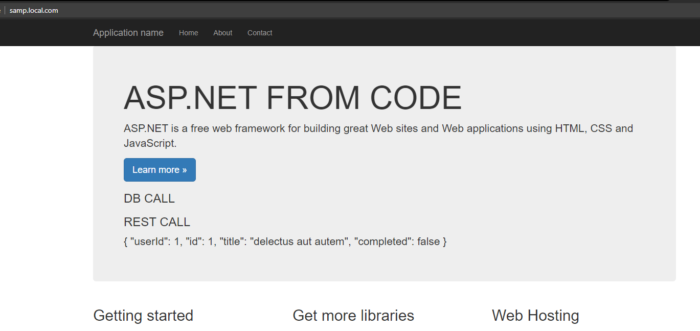
After that just open the browser (you may have to restart the browser and run ipconfig /flushdns command) and type http://samp.local.com

Link to the full codebase – in GitHub repository. You could find there an additional Dockerfile for the multistage build.

I hope this article could be helpful for people who are trying to migrate the legacy windows applications step by step to containerization.

Run, Forest, Run!

Hi you there. This time I decided to share the story how I started running, why it is important and why I’m going to carry on.

Before January 2020, the last time I’d run longer than 100 meters to the bus station was a high school and from my memories, it wasn’t a very enjoyable process (probably because when I was 15 I wanted to do nothing, but just playing video games). Probably everyone had these times at school when the teacher asked you to do something, which was completely outside of the area of your interest.

First time I started considering jogging a year ago, in December 2020. At that time I was up to my ears in work because of very tight deadlines and was spending up to 15 hours daily with the computer. After a week or so, I started to feel annoying pain in my back. I thought that just short breaks during the working days will help, but they didn’t. At that time some gossips started spreading among the people about the new viruses, so I decided to omit gyms and other public places. And you know, after a brief analysis I figured out, that there are not so many things you could do on your own, without very special equipment and with a quick start. I had a few options to choose between: cycling, home workout, yoga, running. For the first option, I didn’t have a good bike, for the next two options – I didn’t have enough willpower to do any physical activities right near my favorite sofa where I used to spend evenings with Netflix, so my choice was running – I had some old snickers and shorts – that was enough for start.

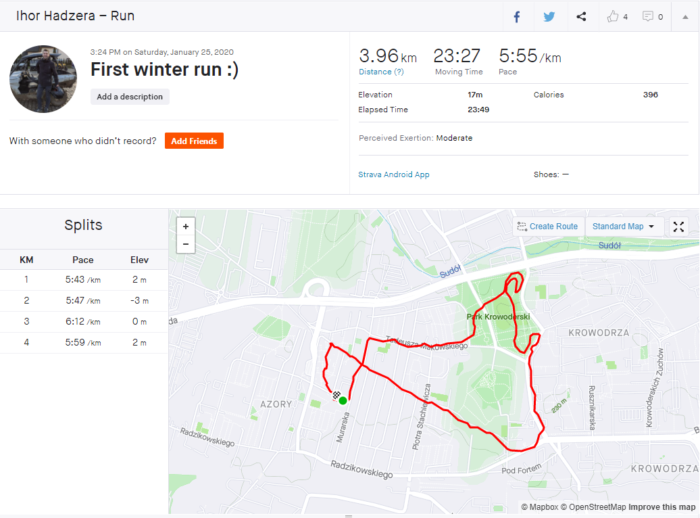
My first run wasn’t at any point fast or long, in addition, it was cold (January 25) and foggy. Probably at that time I made all possible mistakes before the run – wear 3 warm layers of clothes, forgot about warmup, had breakfast right before the running. So if you want to start running, please be smarter than me and read some How-Tos before (example here)

My first “adult” jogging

BUT, after even such failed run, I fell in love with running and it is still true.

So bellow I want to put my personal points, why running rules:

  1. The pain in a back is gone – that was my initial reason to run and after even the first run, I was feeling much better than before. I know, that not because of the miracle power of running, but rather overall physical activity, but for me this activity was running.
  2. That was a big discovery for me, but running helps a lot against daily stress. After full of stress working days, running helps to “refresh the head” and switch the focus to something else (this aspect is certainly very important for me, because there were dozens of times when I was thinking about work for a long time after working hours)
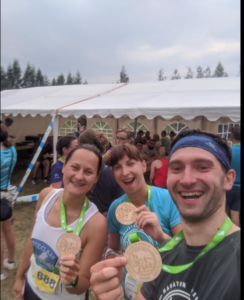
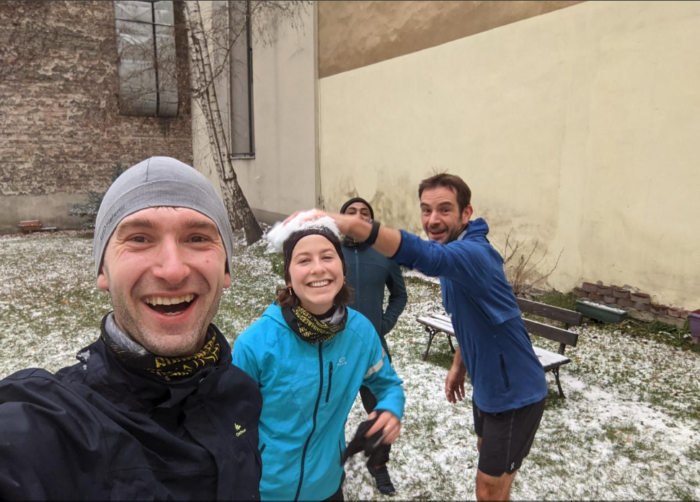
  3. Thanks for running I’ve met new interesting people and improved contact with people I already know. This includes common running events (in a workplace we organize “running Thursdays”, when we do ~5km with colleagues in before lunchtime) as well as some public races (this year I’ve participated in 3 such events and each of them was full of positive emotions and people)
  4. Running helps me to be in a good shape 😉 Well, I’m a pretty skinny guy, but even though I had a few extra kilograms, so after a year of running I did my -10kg (which for sure were extras one).
  5. Last but not least – it helped me do not get out of my mind because of the 2020 year and a half of the year on self-isolation. There were moments (especially in April-May) when everyone had to have a very solid reason to go outside and luckily jogging was one of such reasons (at least in Poland). So especially in times of COVID, running is a very good option.

I’m not a running coach neither a doctor and could not advocate running for everyone, because it also has a lot of cons. But at least for me, running works perfectly and I could recommend it in case you don’t have any contraindications to do so.

The last thing I want to share with you is probably my achievements during 2020 in terms of running. I know they are not gigantic, but it was my first year with running adventures and I will do my best to beat myself next year.

You could also follow my on Strava here.

Stay tuned Guys, Bye

P.S. bellow I will share a few photos from this running year 🙂